
RevCommentPlugin
This plugin allows entry of a short summary of changes made to a topic for a new revision. This summary can be displayed e.g. in a history page of the topic or on the WebChanges page of a web. Changes may also be marked as "minor" by using the "Quiet save" button. Since in Foswiki it is possible to make several changes within the edit lock time (normally 60 minutes) which are accumulated in only one new revision, it is also possible to have several comments for one revision. Furthermore, adding or updating an attachment may also trigger an automatic comment for the current revision. This behaviour can be switched on or off with the help of the preference variable ATTACHMENT_COMMENTS (see below).On this page:
Syntax - Show previous comments
Write%REVCOMMENT{attributes}% anywhere in a topic.
Parameters
| Name | Description | Default |
|---|---|---|
| minor | text to print for a minor change | (minor) |
| separator | delimiter between 2 comments for the same revision | \n |
| topic | name of topic | current topic |
| web | web where topic exists | current web |
| rev | revision | latest revision |
| footer | text after the last comment | </ul> |
| format | format string for each revision comment | <li> $comment $minor |
| header | text before the first comment | <ul> |
Entering new comments
If the skin setting is enabled, a text input field namedcomment will be
added to the Edit screens. Enter your comment when you save your edits, and
it will be saved in the topic.
Examples
%REVCOMMENT% shows the comments for the current revision. if you have RevCommentPlugin enabled, you should see a comment here: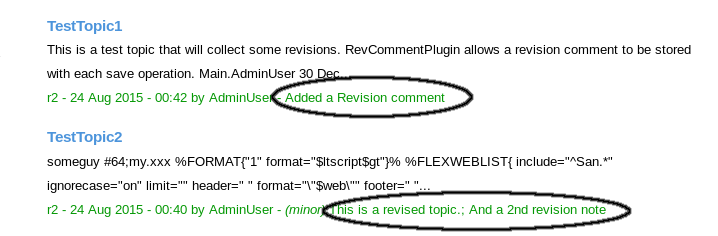 If you have also the HistoryPlugin installed,
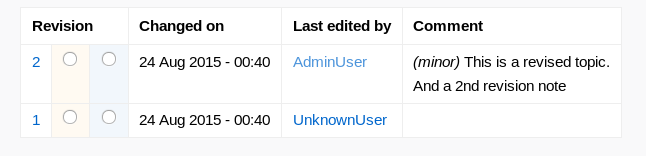
the history of a topic may look like this:
If you have also the HistoryPlugin installed,
the history of a topic may look like this:
Customization
Templates
Note that this extension now ships with 4 templates, and requires a SKIN override to incorporate this extension. Set the SKIN in SitePreferences.- For a Foswiki 2.0 system,
Set SKIN = revcomment,natedit,pattern - For a Foswiki 1.1 system,
Set SKIN = revcom11,pattern
- Either
revcommentorrevcom11substituted for<skin>:-
templates/edit.<skin>.tmpl - Adds the
revcommentparameter to the older Foswiki editor (Plain Text and TinyMCE.) -
templates/edittoolbar.<skin>.tmpl - Adds the
revcommentparameter to the NatEdit editor. -
templates/oopshistory.<skin>.tmpl - Incorporates the revision comments into the topic history displayed by HistoryPlugin.
-
templates/search.<skin>.tmpl - Adds the revision comments to the default search
-
If you are using other skins than the pattern, you will need to fit these template overrides into your site's skin.
These templates add a textfield to the Editor interface:
<input class='foswikiInputField' type='text' style='width:50%' name='revcomment' id='revcomment' />
CSS
Most of the CSS used to display comments is already embedded in the PatternSkinstyles.css and colors.css A small amount of CSS is also
contained in-line in the oopshistory template.
Perl API
Third plugins may register a revision comment using theFoswiki::Plugins::RevCommentPlugin::setComment api. See the PerlDoc for more.
internal package Foswiki::Plugins::RevCommentPlugin
base class to hook into the foswiki core
initPlugin($topic, $web, $user) → $boolean
initialize the plugin, automatically called during the core initialization processfinisPlugin()
clean up after session has finishedgetCore()
get core of this pluginbeforeSaveHandler($text, $topic, $web, $meta )
called before a topic is saved to the storebeforeUploadHandler(\%attrHash, $meta )
called before an attachment is uploaded or changedafterRenameHandler( $oldWeb, $oldTopic, $oldAttachment, $newWeb, $newTopic, $newAttachment )
called when a topic or attachment has been renamedsetComment($commentOrObj) → $hash
public api to register a revision comment for the next save operation example:
my $comment = Foswiki::Plugins::setComment({
                 text => "revision message",
                 minor => 0 / 1, # optional
              });
my $comment = Foswiki::Plugins::setComment("revision message");
The $comment return value is the object being used in the final
store procedure creating the revision comment. It will be invalidated
once the save handler have been executed. So don't keep hold of them
for too long.
Installation Instructions
You do not need to install anything in the browser to use this extension. The following instructions are for the administrator who installs the extension on the server. Open configure, and open the "Extensions" section. "Extensions Operation and Maintenance" Tab → "Install, Update or Remove extensions" Tab. Click the "Search for Extensions" button. Enter part of the extension name or description and press search. Select the desired extension(s) and click install. If an extension is already installed, it will not show up in the search results. You can also install from the shell by running the extension installer as the web server user: (Be sure to run as the webserver user, not as root!)cd /path/to/foswiki perl tools/extension_installer <NameOfExtension> installIf you have any problems, or if the extension isn't available in
configure, then you can still install manually from the command-line. See https://foswiki.org/Support/ManuallyInstallingExtensions for more help.
- Test if the installation was successful:
- Add the SKIN setting to enable the template modifications.
- Create a topic in your Sandbox web. Add a %REVCOMMENT% macro to the topic, and save it with a comment.
- If you have also the HistoryPlugin installed, view the history of the topic you just created. It should contain the comment.
Change History
| 17 Jan 2025 | added translations to this plugin |
| 20 Nov 2020 | Michael Daum - fix oopshistory templates; added dependency on latest HistoryPlugin |
| 20 Oct 2020 | Michael Daum - rewrite: fix storage format while trying to be backwards compatible; removed plugin settings - these are all in configure now; improve tag handler; performance improvements by converting the plugin to an OO interface; added public api to set the revision comment by other plugins |
| 01 Sep 2015 | Foswikitask:Item13657: Regex issues on perl 5.22 |
| 15 Aug 2015 | Foswikitask:Item11068: RevCommentPlugin conflicts with CommentPlugin Foswikitask:Item13619: Add compatibility for Foswiki 2.0 Foswikitask:Item12880: Preserve rev-comment input across preview |
| 11 Nov 2011 | Item11249 - added registerMETA |
| 22 Jan 2009 | Kenneth Lavrsen - Added the two example images as attachments to the topic so they also get uploaded to foswiki.org. No need to upgrade from 08 Dec 2008 version if you already installed that. |
| 08 Dec 2008 | Kenneth Lavrsen - Changed the author to myself. JChristophFuchs is the original author but announced in 2006 that he no longer maintains this plugin. So now I officially take the task as maintainer. Plugin is changed to Foswiki namespace and tested and works under Foswiki 1.0.0. Policy is now feel free to modify but please do not break compatibility. |
| 14 Apr 2006 | <noautolink> added to default pre/post rendering output of REVCOMMENT tag |
| 14 Apr 2006 | Minor update for Dakar 4.0.2 |
| 22 Apr 2005 | Initial version |
Copyright © Simons Foundation. All material on this collaboration platform is the property of the Simons Foundation.
This website is using cookies. More info.
That's Fine